Most of what a people team does in a week isn't a project. It's a steady stream of small things: a record that needs updating, a request for a few days off, a timesheet that doesn't add up, a question about a payslip or a health plan. None of it is hard on its own. What makes it slow is that each piece usually lives somewhere different, so every small task turns into a lookup, a copy and a follow-up message.
Syott HR keeps that everyday work in one system. Profiles, time off, hours, timesheets and employee questions share the same people and the same data, so a change made in one place is already true everywhere else. This article walks through a normal week of that work, using the people from our product tours as examples, and shows what each step looks like in Syott.
Records that stay current
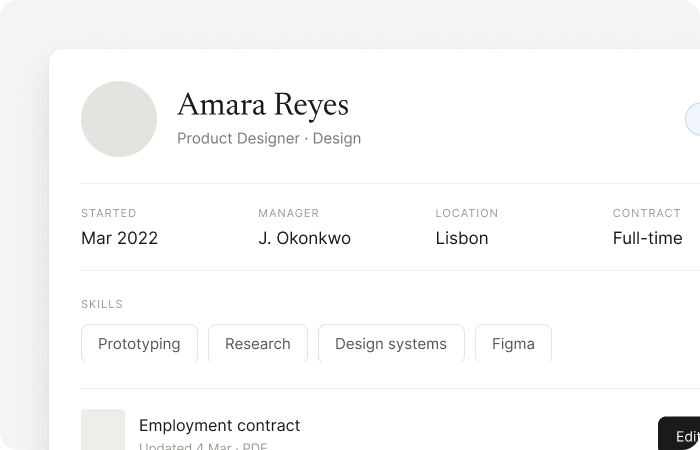
Everything starts with the employee profile. Each person has one complete, up-to-date record: contact details, role history, skills and documents. When a profile is the single source for who someone is and what they do, every other part of the system can rely on it.
The part that saves the most time is who keeps it current. Employees can update their own information, so HR spends less time on data entry and more time on people. In the example below, Amara, a product designer, moves from Porto to Lisbon and updates her location herself. She adds a new skill while she's there. Nobody in HR had to retype anything, and the change is recorded against her name.
Amara Reyes
Product Designer · Design
- Started
- Mar 2022
- Manager
- Marco
- Location
- PortoLisbon
- Contract
- Full-time
Updated by Amara · just now
PrototypingResearchDesign systemsFigma Accessibility
- Product DesignerSince Jan 2024
- Junior Product DesignerMar 2022 – Dec 2023
Tom Lang · 3 days
Wed 12 – Fri 14 · Annual leave
ApproveApprovedWho's out this week
Mon 10Tue 11Wed 12Thu 13Fri 14
Tom's balance14.511.5 days
Contract amendment
SignedDocuments · Priya Shah
Contract amendmentSent by HR · PDFSigned by Priya · just now Awaiting signatureSigned
Remote work policyExpires in 21 days Reminder set
OnboardingOffboarding
Week one — Lena 3 of 54 of 5
 Jide Okonkwo
CPO
18 people19 people
 Marco
Design Lead
Design · 67
 Priya Shah
Engineering Manager
Engineering · 9
 Ana Moreira
Head of People
People · 4
 Amara Reyes
Product Designer
 Lena
Product Designer
New
 Tom Lang
Engineer
Out Wed–Fri
 Nils Berg
Engineer
Because the profile sits at the centre, the org chart follows from it. Reporting lines, departments and open roles come from the same records, so the chart updates as the team grows instead of being redrawn by hand each quarter. When someone joins a team, they appear under their manager. When someone changes role, the chart already shows it.
Time off in a few clicks
Time off is the request most people make most often, and it's where the back-and-forth tends to pile up. In Syott, employees submit requests from their dashboard, managers approve them, and balances update on their own. The whole team can see who's out, so nobody has to ask around before planning a meeting or a handover.
In the scene below, Tom asks for three days at the end of the week. The request goes up the reporting line to Priya, his manager, who approves it. The answer comes back down to Tom, his balance drops by the days he's taking, and the team's view of the week marks him as out from Wednesday to Friday.
Amara Reyes
Product Designer · Design
- Started
- Mar 2022
- Manager
- Marco
- Location
- PortoLisbon
- Contract
- Full-time
Updated by Amara · just now
PrototypingResearchDesign systemsFigma Accessibility
- Product DesignerSince Jan 2024
- Junior Product DesignerMar 2022 – Dec 2023
Tom Lang · 3 days
Wed 12 – Fri 14 · Annual leave
ApproveApprovedWho's out this week
Mon 10Tue 11Wed 12Thu 13Fri 14
Tom's balance14.511.5 days
Contract amendment
SignedDocuments · Priya Shah
Contract amendmentSent by HR · PDFSigned by Priya · just now Awaiting signatureSigned
Remote work policyExpires in 21 days Reminder set
OnboardingOffboarding
Week one — Lena 3 of 54 of 5
Jide Okonkwo
CPO
18 people19 people
Marco
Design Lead
Design · 67
Priya Shah
Engineering Manager
Engineering · 9
Ana Moreira
Head of People
People · 4
Amara Reyes
Product Designer
Lena
Product Designer
New
Tom Lang
Engineer
Out Wed–Fri
Nils Berg
Engineer
There are no emails to chase and no spreadsheet to reconcile at the end of the month. The request, the approval and the balance are one record, and everyone who needs to see it can.
Hours, recorded as they happen
For teams that track time, the quality of everything downstream depends on the first step: recording hours when they're worked rather than reconstructing them later. Employees clock in and out from their desktop or phone with a single tap. Automatic rounding rules, break tracking and overtime calculations are applied as the day goes on, so the timesheet builds itself.
Below, Ana opens her phone and clocks in. Her day starts as a live block on the week's board, next to the shifts the rest of the team is working. When she takes a break or clocks out, the board and her timesheet reflect it without anyone entering it twice.
Right nowWhole company
Working3132
On break4
Out76
Week 24 scheduleJune 10–14 Locked
Mon 10Tue 11Wed 12Thu 13Fri 14
Ana Moreira
Working
09–17
09–17
09–17
Tom Lang
On break
09–17
09–17
13–21
13–21
Priya Shah
Working
13–21
09–17
09–17
Marco
Late · 09:31
07–15
07–15
07–15
07–15
Nils Berg
Out
09–17
09–17
09–17
09–17
Available this week
Nils Berg
Lena
Nils Berg notifiedNew shift · Thu 13 · 09:00–17:00
June 1–15
80h 00m
84h 30m incl. 4h 30m overtime
79h 45m
80h 00m
72h 10m Missing clock-out
Approve 4Locked
Hours into payrollJune run · June 1–15
total hours
- Regular 1,284h · 1.0×
- Overtime 96h · 1.5×
- Holiday premium 24h · 2.0×
- Night differential 40h · +12%
Ready to syncSynced to the June run
Monday, 10 June
Today Not clocked inClocked in
0:006:12
- Started
- 09:02
- Break
- 00:24
- Overtime this period
- 2h 15m
Clock inClock out
The same board gives managers a view of the day as it happens: who's working, who's on a break and who's out. Attendance dashboards surface patterns such as late arrivals and overtime trends before they become problems, instead of after the pay period has closed.
Timesheets that reach payroll clean
At the end of a period, someone has to sign off the hours. That job is usually where small errors are caught, or where they slip through. In Syott, managers review timesheets and approve them in bulk with one click. They can flag exceptions, add comments and lock approved periods, so payroll always gets clean, verified data.
In this scene, four timesheets are ticked off in sequence. Nils's is flagged because he forgot to clock out one evening, and his note explains what happened. The four that are in order are approved together, the period is locked, and Nils's timesheet waits until it's resolved rather than holding up everyone else.
Right nowWhole company
Working3132
On break4
Out76
Week 24 scheduleJune 10–14 Locked
Mon 10Tue 11Wed 12Thu 13Fri 14
Ana Moreira
Working
09–17
09–17
09–17
Tom Lang
On break
09–17
09–17
13–21
13–21
Priya Shah
Working
13–21
09–17
09–17
Marco
Late · 09:31
07–15
07–15
07–15
07–15
Nils Berg
Out
09–17
09–17
09–17
09–17
Available this week
Nils Berg
Lena
Nils Berg notifiedNew shift · Thu 13 · 09:00–17:00
June 1–15
80h 00m
84h 30m incl. 4h 30m overtime
79h 45m
80h 00m
72h 10m Missing clock-out
Approve 4Locked
Hours into payrollJune run · June 1–15
total hours
- Regular 1,284h · 1.0×
- Overtime 96h · 1.5×
- Holiday premium 24h · 2.0×
- Night differential 40h · +12%
Ready to syncSynced to the June run
Monday, 10 June
Today Not clocked inClocked in
0:006:12
- Started
- 09:02
- Break
- 00:24
- Overtime this period
- 2h 15m
Clock inClock out
Once hours are approved, they sync directly into payroll. Overtime, holiday premiums and shift differentials are calculated automatically, which removes the step where approved hours are exported, re-keyed and checked a second time.
A direct line to HR
The last part of the everyday work is the questions. Employees and managers need a way to reach HR that doesn't depend on knowing who to email. In Syott, they can submit a request from anywhere in the app, as a simple form, a chat message or a voice note, and every request becomes a trackable ticket that HR can prioritise and assign.
Before a ticket is even created, a searchable help center can answer the common questions, with suggestions that surface relevant articles based on what the employee is doing. For everything else, tickets are routed automatically by topic, department or priority. Payroll questions go to payroll and benefits questions go to benefits.
Here, Amara asks how to add her newborn to her health plan. Her question becomes a ticket, the benefits rule picks it up, and it reaches Priya on the benefits team without anyone sorting the queue by hand.
Shared inbox24 open
TopicPayroll
Tom Lang
Payroll team
TopicBenefits
Priya Shah
Benefits team
DepartmentBerlin
Nils Berg
Local People Partner
PriorityUrgent
Ana Moreira
HR lead

How do I add my newborn to my health plan?
Asked HR · 09:12 ResolvedCongratulations, Amara! You can add your baby under Benefits, Dependents, from the date of birth.
Health plan · Dependents94%
Benefits portal guide81%
Parental leave policy72%
#2841 · Benefits #2841 · Benefits #2841
HR works from a shared inbox with statuses, tags and SLA tracking, so it's clear what's pending, what's overdue and who's handling what. When Priya replies, the answer goes back to Amara in the place she asked, and the ticket is marked resolved.
Why one place matters
Each of these steps exists in some form in most HR stacks. The difference is what happens between them. When profiles, time off, hours, timesheets and questions share one system, the information one step produces is already there for the next. Tom's approved time off is already on the team's calendar. Ana's hours are already on her timesheet. Amara's new location is already on her profile when HR answers her question.
That's the point of keeping everyday HR in one place: fewer hand-offs, fewer copies of the same fact, and more of the team's week spent on the people rather than on the paperwork about them.
See it with your own team
The scenes in this article come from the Core HR, Time tracking and Employee support tours on our site, where you can scroll through each feature in more detail. To see Syott HR with your own people and processes, book a demo or talk to our sales team.