Hiring brings more people together than almost anything else a company does. A recruiter opens the role, a hiring manager reads applications, three or four interviewers each form a view, someone drafts the offer, and the candidate waits to hear back. When each of them works from a different tool, the hand-offs are where time is lost: a spreadsheet that is a day out of date, feedback sitting in someone's inbox, an offer letter rebuilt from last year's template.
Syott Recruit is the applicant tracking system in Syott. It keeps every part of that work in one place, so the whole hiring team sees the same candidates, the same history and the same next step. This article follows one role from the job post to the signed offer, and shows what each person on the team does along the way.
The people in it are examples taken from our product tour: a Senior Product Designer role, a candidate called Sam Lee, and Priya Shah, a recruiter who looks after the role.
Post once, reach every board
Every role starts with a job post. In Syott Recruit you write it once, customise the application form for that role and add screening questions. A design role can ask for a portfolio, an engineering role for something else, and each form collects exactly what that team needs to decide.
The role then goes live on your own careers page and on the job boards you use, such as LinkedIn, Indeed, Glassdoor and more, with a single click. All postings are managed from one dashboard, so changing or closing a role does not mean visiting each board in turn.
Jobs › Careers site
Careers siteYour public job board
Open site Publish siteLiveSite address
careers.kestrel.comCustom domain Primary Not verifiedVerified
Branding
careers.kestrel.com/jobs
Jobs at Kestrel
Build tools people love, from wherever you do your best work.
- Senior Product Designer Design · Lisbon · Full-time · Hybrid €55,000–€70,000 a year 2d ago
- Backend Engineer Engineering · Berlin · Full-time · On-site Today
- Brand Designer Design · Berlin · Full-time · Remote 1w ago
- People Partner People · Lisbon · Full-time · Hybrid 2w ago
careers.kestrel.com/jobs/senior-product-designer
All roles
Senior Product Designer
Design Lisbon Full-time Hybrid
Pay: €55,000–€70,000 a year
About the role
Shape the tools thousands of teams use to plan their week. You will own the design of scheduling, from the first sketch to release.
What you will do
- Lead the design of scheduling and planning
- Talk to customers every month
- Work side by side with product and engineering
Jobs › Senior Product Designer › Job boards
Job board distributionPosted to 6 places in one click
Post to boardsBoardStatusViewsApplications
- K Careers sitecareers.kestrel.com QueuedPosted –312 –14
-
 LinkedInJob board
QueuedPosted
–846 –9
-
 IndeedJob board
QueuedPosted
–410 –6
-
 GlassdoorJob board
QueuedPosted
–268 –3
-
 StepStoneJob board
QueuedPosted
–121 –2
-
 XINGJob board
QueuedPosted
–94 –1
Jobs › Senior Product Designer › Application form
Application formDesign roles
Add questionQuestions asked after name, email, phone, LinkedIn and CV.
- 1 Which tools do you use daily? Long text Required
- 2 Portfolio · PDF or link File upload Required
- 3 60-second introduction Video Required
- 4 Skills assessment Assessment Required
Back to the job
Apply for Senior Product Designer
About you
Questions
Progress saved
Submit applicationApplication submitted
Application status Your application Senior Product Designer · Submitted 2 June
In reviewInterviewing- Applied
- Screening
- Interview
- Offer
Next step
Panel interview · Thu 12 June, 14:00
With Priya, Tom, Nils Confirm your slotConfirmedDocuments
- Sam-Rivera-CV.pdfReceived
- Sam-Rivera-Portfolio.pdfReceived
- Right to work UploadReceived
Because every application comes back into the same place, you can also see where candidates come from. Over time that tells you which boards bring the candidates who go furthest in your process.
Candidates can apply from any device. Forms work on a phone, a CV uploads in one tap, and progress is saved, so someone who starts an application on the way to work can finish it later without starting over. Qualified candidates float to the top automatically, so the people who answered every screening question well are the ones the team sees first.
Find anyone, then narrow it down
Once applications arrive, the list grows quickly. Syott Recruit shows every applicant in one list, grouped by position, with their stage, progress, labels and owner on each row.
Finding a person is a keystroke away. Press ⌘K, type a name, and the candidate's row is right there. To work through a larger group, filter the list by stage, label, owner, priority or position: ask for everyone in the Interview stage who came through a referral, for example, and the list keeps only those candidates.
Small updates do not need a form either. From the keyboard, a recruiter can assign a candidate to a colleague or raise their priority, and the row updates in place. When Priya takes over Sam's application, it shows on his row straight away, for everyone.
A pipeline the whole team can see
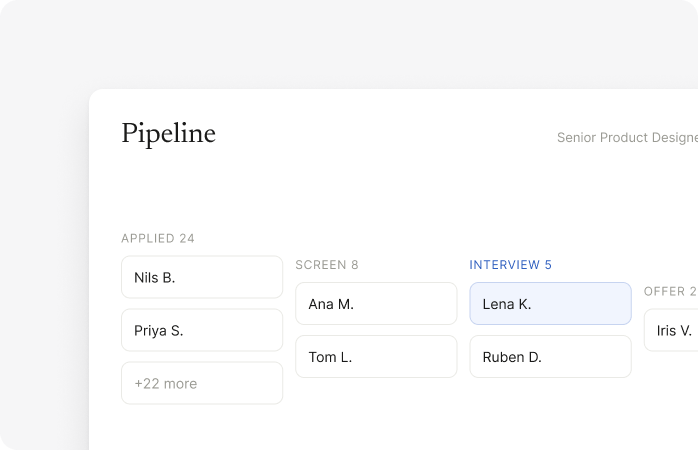
The list is one way to look at candidates. The board is another. Switch the grouping from position to stage and the same candidates become a visual pipeline, with a column for each stage from Applied through Screen, Interview and Offer to Hired.
Search⌘K




CAN-226
Maya Khan
Senior Product Designer 1/5 LinkedIn
CAN-223
Omar Haddad
Backend Engineer 1/5 Remote
CAN-221
Ruben Dias
Senior Product Designer 2/5 LinkedIn
CAN-217
Jonas Pohl
Backend Engineer 2/5 LinkedIn
CAN-227
Lucas Faria
People Partner 2/5 LinkedIn
CAN-209
Iris Varga
Senior Product Designer 3/5 Referral
CAN-205
Elif Aydin
Backend Engineer 3/5 LinkedIn
CAN-198
Kai Lund
Senior Product Designer 4/5 Referral
CAN-214
Sam Lee
Senior Product Designer 4/5 Referral
CAN-219
Noor Saleh
People Partner 5/5 Referral
CandidatesSenior Product DesignerSam Lee
Sam LeeSenior Product Designer · Offer
sam.lee@example.com
Key information
- Owner
- Ana MoreiraPriya Shah
- Stage
- Offer
- Phone number
- +44 20 7946 0958
- City
- Lisbon, Portugal
- Source
- Referral · Ana Moreira
- Applied
- 12 Mar
- Last contacted
- Today
- Preferred contact
-
Applied, referred by Ana Moreira
-
Moved to Screen by Ana Moreira
-
Ana Moreira sent "Next steps for your application"
-
Panel interview scheduled with Priya, Tom, Nils
-
Moved to Interview by Priya Shah
-
Priya Shah left a note
@Tom Lang Strong portfolio. Let's move quickly on this one.
-
Moved to Offer by Priya Shah
-
Priya Shah sent the offer from the Design · Senior template
-
Offer signed by Sam Lee
Score4.6
Priya Shah4.5
Tom Lang4.8
 Nils Berg4.4
Average of 3 scorecards, same criteria for every candidate
Interviews1
Panel interview20 Mar, 14:00 · 3 interviewers
Documents23
PDFSam-Lee-CV.pdfCV, uploaded by Sam
PDFPortfolio.pdfPortfolio
PDFOffer-letter.pdfSigned by Sam · 30 Mar
Sam
Candidates
Sam LeeCAN-214 · Senior Product Designer
 Samira CostaCAN-182 · Backend Engineer
Actions
Add candidateC
Ana Moreira1
Priya Shah2
Tom Lang3
Lena Fischer4






Moving a candidate on is a matter of dragging their card from one stage to the next. The counts update as you go, so the hiring manager can see at a glance how many people are waiting for a screen, how many are mid-interview and how many offers are out. Nobody has to ask where things stand, because the board is the answer.
One record for every candidate
Open a candidate and everything about them is in one record. On the left are their profile and key information: who owns the application, the current stage, contact details, where they came from and when they applied. In the middle, tabs hold the timeline, notes, discussions, calls, emails and tasks. On the right sit their score, their interviews and their documents.
Search⌘K
CAN-226
Maya Khan
Senior Product Designer 1/5 LinkedIn
CAN-223
Omar Haddad
Backend Engineer 1/5 Remote
CAN-221
Ruben Dias
Senior Product Designer 2/5 LinkedIn
CAN-217
Jonas Pohl
Backend Engineer 2/5 LinkedIn
CAN-227
Lucas Faria
People Partner 2/5 LinkedIn
CAN-209
Iris Varga
Senior Product Designer 3/5 Referral
CAN-205
Elif Aydin
Backend Engineer 3/5 LinkedIn
CAN-198
Kai Lund
Senior Product Designer 4/5 Referral
CAN-214
Sam Lee
Senior Product Designer 4/5 Referral
CAN-219
Noor Saleh
People Partner 5/5 Referral
CandidatesSenior Product DesignerSam Lee
Sam LeeSenior Product Designer · Offer
sam.lee@example.com
Key information
- Owner
- Ana MoreiraPriya Shah
- Stage
- Offer
- Phone number
- +44 20 7946 0958
- City
- Lisbon, Portugal
- Source
- Referral · Ana Moreira
- Applied
- 12 Mar
- Last contacted
- Today
- Preferred contact
-
Applied, referred by Ana Moreira
-
Moved to Screen by Ana Moreira
-
Ana Moreira sent "Next steps for your application"
-
Panel interview scheduled with Priya, Tom, Nils
-
Moved to Interview by Priya Shah
-
Priya Shah left a note
@Tom Lang Strong portfolio. Let's move quickly on this one.
-
Moved to Offer by Priya Shah
-
Priya Shah sent the offer from the Design · Senior template
-
Offer signed by Sam Lee
Score4.6
Priya Shah4.5
Tom Lang4.8
Nils Berg4.4
Average of 3 scorecards, same criteria for every candidate
Interviews1
Panel interview20 Mar, 14:00 · 3 interviewers
Documents23
PDFSam-Lee-CV.pdfCV, uploaded by Sam
PDFPortfolio.pdfPortfolio
PDFOffer-letter.pdfSigned by Sam · 30 Mar
Sam
Candidates
Sam LeeCAN-214 · Senior Product Designer
Samira CostaCAN-182 · Backend Engineer
Actions
Add candidateC
Ana Moreira1
Priya Shah2
Tom Lang3
Lena Fischer4
The timeline tells the story in order. For Sam it reads: applied through a referral, moved to Screen, sent an email about next steps, panel interview scheduled with three interviewers, moved to Interview. Notes and @mentions sit in the same timeline, so when Priya writes that Sam has a strong portfolio and tags a colleague, the context stays with the candidate instead of in a private chat.
Candidates have their own view too. They create an account to apply, upload documents and follow the status of their application in real time, which means fewer emails just checking in, and a better experience for the people you most want to hire.
Structured feedback, then the offer
Good hiring decisions come from comparable feedback. In Syott Recruit, interviews are scheduled from the candidate's record, and every interviewer fills in a scorecard against the same criteria. The scores add up to one view of the candidate, and the panel can compare candidates side by side on standardised evaluation criteria rather than on whoever spoke last in the debrief.
Search⌘K
CAN-226
Maya Khan
Senior Product Designer 1/5 LinkedIn
CAN-223
Omar Haddad
Backend Engineer 1/5 Remote
CAN-221
Ruben Dias
Senior Product Designer 2/5 LinkedIn
CAN-217
Jonas Pohl
Backend Engineer 2/5 LinkedIn
CAN-227
Lucas Faria
People Partner 2/5 LinkedIn
CAN-209
Iris Varga
Senior Product Designer 3/5 Referral
CAN-205
Elif Aydin
Backend Engineer 3/5 LinkedIn
CAN-198
Kai Lund
Senior Product Designer 4/5 Referral
CAN-214
Sam Lee
Senior Product Designer 4/5 Referral
CAN-219
Noor Saleh
People Partner 5/5 Referral
CandidatesSenior Product DesignerSam Lee
Sam LeeSenior Product Designer · Offer
sam.lee@example.com
Key information
- Owner
- Ana MoreiraPriya Shah
- Stage
- Offer
- Phone number
- +44 20 7946 0958
- City
- Lisbon, Portugal
- Source
- Referral · Ana Moreira
- Applied
- 12 Mar
- Last contacted
- Today
- Preferred contact
-
Applied, referred by Ana Moreira
-
Moved to Screen by Ana Moreira
-
Ana Moreira sent "Next steps for your application"
-
Panel interview scheduled with Priya, Tom, Nils
-
Moved to Interview by Priya Shah
-
Priya Shah left a note
@Tom Lang Strong portfolio. Let's move quickly on this one.
-
Moved to Offer by Priya Shah
-
Priya Shah sent the offer from the Design · Senior template
-
Offer signed by Sam Lee
Score4.6
Priya Shah4.5
Tom Lang4.8
Nils Berg4.4
Average of 3 scorecards, same criteria for every candidate
Interviews1
Panel interview20 Mar, 14:00 · 3 interviewers
Documents23
PDFSam-Lee-CV.pdfCV, uploaded by Sam
PDFPortfolio.pdfPortfolio
PDFOffer-letter.pdfSigned by Sam · 30 Mar
Sam
Candidates
Sam LeeCAN-214 · Senior Product Designer
Samira CostaCAN-182 · Backend Engineer
Actions
Add candidateC
Ana Moreira1
Priya Shah2
Tom Lang3
Lena Fischer4
When the team decides to hire, the offer is generated from a template, so the right terms for the role are filled in rather than retyped. It goes out for e-signature from the same record, and you can track acceptance without leaving the platform. Set an expiry date, and automated follow-up reminders take care of the nudging. In Sam's timeline, the offer being sent and then signed are simply the next two entries, and the signed letter is filed with his documents.
Throughout the process, built-in analytics measure the hiring funnel: time to hire, source effectiveness, conversion between stages and diversity metrics. They show where candidates wait longest, so you can spot bottlenecks and improve the process for the next role.
From signed offer to day one
A signed offer is the start of onboarding, not the end of the process. Syott Recruit is part of Company OS, alongside Syott HR, so the work does not have to be handed to another system.
Candidates › Lena Fischer
Lena FischerProduct Designer · Referral
Offer- Applied
- Screen
- Interview
- Offer
- Hired
Score
4.6Strong yes
3 scorecards
Offers
Product Designer offerDraftPending approval
€62,000 · Starts 1 Feb 2027Terms
- Total (annualised)
- €62,000
- Start date
- 1 Feb 2027
- Expires
- 4 Dec 2026
- Template
- Standard offer
Approvals
- 1 Hiring managerBy Priya Shah PendingApproved
- 2 HR business partnerBy Ana Moreira PendingApproved
- 3 FinanceBy Tom Lang PendingApproved
HR › Pre-hires › Add pre-hire
Welcome to Syott — set up your accountSyott · lena.fischer@example.com
 Syott
Welcome to Syott
Hi Lena,
Your onboarding is ready. Use the link below to set up your account and complete your personal details, documents, and policies.
Set up your account This link expires in 7 days.SyottEmployee Onboarding
About you · Step 1 of 15Admin · Step 5 of 15Workplace · Step 9 of 15Legal & account · Step 13 of 15
Personal information
Check your details and fill in anything missing.
Managed by HR
- Role
- Product Designer
- Department
- Design
- Start date
- 1 Feb 2027
- Employment
- Full-time
- Reports to
- Priya Shah
- Office
- Lisbon
Documents to sign
Read and sign each document before your first day.
- Offer letter & employment agreementRequired
- Non-Disclosure AgreementRequired
- Intellectual Property AssignmentRequired
- Non-Compete & Non-Solicit AgreementRequired
- Equipment Loan AgreementRequired
4 of 5 signed5 of 5 signed
- Offer letter & employment agreement Signed
- Non-Disclosure Agreement Signed
- Intellectual Property Assignment Signed
- Non-Compete & Non-Solicit Agreement Signed
- Equipment Loan Agreement RequiredSigned
Equipment Loan Agreement
Type your full legal name to signLena Fischer
Sign documentSigned by Lena FischerSet up your account
Usernamelena.fischer
You'll sign in with
Passwordless magic code sent to your email
You're all set, Lena!
Onboarding is complete. Check your email for the magic-code sign-in link and jump into Syott OS.
- Check your email for access instructions
- Sign in to Syott OS with your new account
- Your manager will be in touch to schedule your first day
HR › Onboarding
Create a pre-hire, run onboarding, then activate them into a worker.Lena FischerProduct Designer · Design
- Created
- Invite sent
- In progress
- Completed
- Activated
- Start date
- 1 Feb 2027
- Employment type
- Full-time
Activate → create worker Activating... Worker created
Good morning, Lena
Here's what's happening across your workspace.
Pre-hire createdLena Fischer, from the signed offer
Lena Fischer
CandidateOffer approvedOffer signedPre-hireInvite sentIn progressSignedCompletedActivatedWorker
As soon as an offer is accepted, onboarding can provision accounts, request equipment and assign software licences, and IT and facilities get a heads-up without HR having to chase anyone. The new hire's details are already there from the application, so nothing needs to be typed in twice.
See it with your own roles
Syott Recruit is designed so that the recruiter, the hiring manager, the interview panel and the candidate are all looking at the same thing: one post, one pipeline, one record and one offer. If you would like to see it with your own open roles and hiring process in mind, book a demo or talk to our sales team.